

Key takeaways
- Find the best tablet stands for desks with adjustable angles, sturdy bases and foldable designs that lift your screen for work, calls and reading.
A tablet propped against a mug or lying flat next to your keyboard is hard on your neck, your wrists and your patience. Whether your tablet serves as a second screen beside your monitor, a recipe display while you cook, or the main device for video calls and reading, the right stand lifts it to a comfortable height, holds the angle you set and keeps it steady while you tap, type and swipe. The best tablet stands for desks do all of that without wobbling, slipping or taking over your whole work surface.
This guide explains what separates a dependable desk stand from a flimsy one, then presents five well-matched options: a classic adjustable cradle, a compact aluminum dock, a rotating holder with a wide tilt range, a swiveling kiosk-style stand for shared spaces and a fold-flat model that travels between rooms. Every pick below is a tabletop design made for desks, counters and home office setups.
As an Amazon Associate, I earn from qualifying purchases.
How to Choose a Tablet Stand for Your Desk
Match the Stand to Your Tablet Size
Stands are built around device ranges, and the fit matters more than it first appears. A cradle sized for phones and small e-readers will strain under a large tablet, while an oversized holder can let a mini tablet slide around. Check the supported screen range in the listing and measure your tablet in its case, because a thick protective case adds width at the cradle. If you switch between a tablet and a phone during the day, pick a stand whose range covers both so one holder handles every device on your desk.
Decide How Much Adjustment You Need
Fixed stands hold one angle. Adjustable stands let you tilt the screen for typing, reading or watching, and some add height adjustment or a rotating base. Think about how you actually use the tablet: a stand used mainly for video calls needs a higher, more upright angle, while one used for drawing or note taking should tilt back low and stay put under pen pressure. A rotating base is worth having if you share your screen with someone sitting beside you or turn the tablet between portrait and landscape often.
Look for a Stable, Weighted Base
A stand is only as good as its base. Wider, heavier bases resist tipping when you tap the top corner of the screen, and rubber or silicone pads underneath keep the stand from sliding across a smooth desk. Cradle hooks should be deep enough to hold the tablet securely, with padding where the device rests so the frame does not scuff the edges. If your desk is crowded, a foldable stand that tucks away in a drawer frees up space when the tablet is not in use.
Check the Material and Build
Aluminum stands feel solid, shed heat and suit a permanent desk setup. Plastic stands are lighter and easier to carry between rooms. Hinges are the part that wears first, so look for firm joints that hold their position instead of slowly drooping under the weight of a larger tablet. A stand with a cable opening or a ledge that leaves the charging port clear lets you keep the tablet plugged in while it sits in the cradle, which matters for all-day second-screen use.
Plan Around Your Desk Layout
Where the stand sits shapes the rest of your desk. A compact footprint works beside a monitor or on a narrow desk, while a kiosk-style stand with a broad base suits a reception counter, a kitchen island or a workshop bench. Consider viewing distance as well: the stand should place the screen where you can read text without leaning in. If the tablet doubles as a clock or photo display when idle, a stand that looks tidy on its own is a small bonus.
The 5 Best Tablet Stands for Desks
1. Lamicall Tablet Stand, Adjustable Tablet Holder
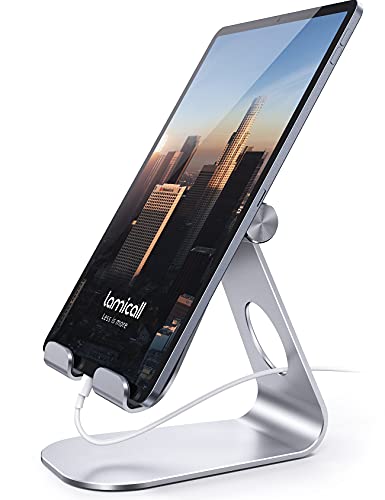
The Lamicall adjustable holder is the classic desk cradle that fits nearly any setup. It supports devices from 4 to 13 inches, so it handles everything from a phone to a large tablet in one holder, and the adjustable hinge lets you dial in a viewing angle for reading, calls or watching video. It is a sensible first pick for a home office desk where the tablet changes roles throughout the day.
Specs
- Brand: Lamicall
- Model: ISD 0003
- Fits devices: 4 to 13 inches
- Works with: iPad Pro 11, 9.7, 10.5 and 12.9, iPad Air and Mini, Galaxy Tab, Kindle, Switch and phones
- Adjustment: adjustable viewing angle
- Style: desktop dock holder
2. UGREEN Tablet Stand Holder, Adjustable
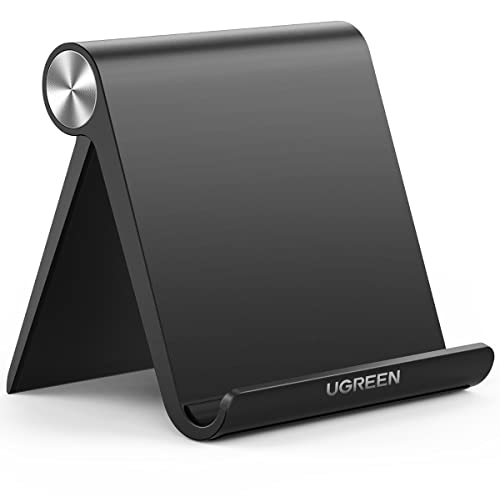
UGREEN’s adjustable holder is a compact desktop dock that keeps a small footprint while holding tablets up to the largest sizes. The angle adjusts to suit typing or viewing, and the simple cradle design makes it easy to drop the tablet in and lift it out as you move around the house. It suits tidy desks where the stand should stay out of the way until the tablet comes out.
Specs
- Brand: UGREEN
- Model: 50748
- Fits devices: tablets and phones, including 12.9-inch class tablets
- Works with: iPad Pro 11, 9.7 and 10.5, iPad Air and Mini, iPhone models
- Adjustment: adjustable viewing angle
- Style: portable desktop dock
3. OMOTON T1 Tablet Stand Holder, Adjustable

The OMOTON T1 is an aluminum desktop cradle built for people who adjust their screen angle often. Its holder rotates through 210 degrees, so you can move from a low typing angle to an upright reading position without lifting the tablet out. The solid metal build gives it a planted feel on the desk, and the cradle accepts phones, e-readers and tablets up to 13 inches, including large models in their cases.
Specs
- Brand: OMOTON
- Model: T1
- Material: aluminum
- Fits devices: phones, e-readers and tablets up to 13 inches
- Works with: iPad Pro 12.9 and 9.7, iPad Air and Mini, Galaxy Tab and iPhone models
- Adjustment: 210-degree rotating cradle
- Style: desktop dock cradle
4. AboveTEK Retail Kiosk iPad Stand
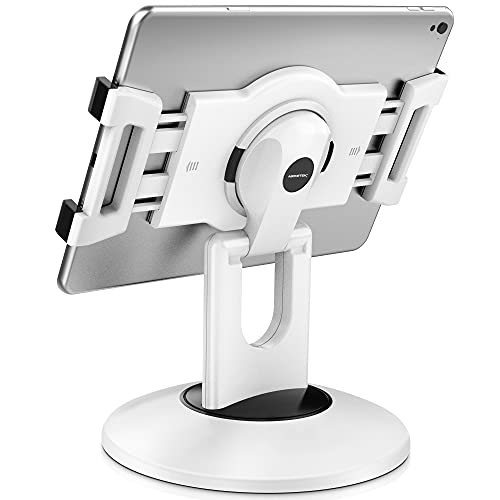
The AboveTEK kiosk stand is the heavy-duty option for shared and public-facing desks. The base swivels a full 360 degrees, which makes it easy to turn the screen toward a client, a coworker or yourself, and the clamp-style holder grips tablets from 6 to 13 inches. It was designed for store counters, reception desks and kitchen worktops, and that commercial build translates to a stand that stays exactly where you put it at home, too.
Specs
- Brand: AboveTEK
- Model: TS-138W
- Fits devices: 6 to 13 inches
- Works with: iPad, iPad Mini and iPad Pro, plus other tablets in range
- Adjustment: 360-degree rotating base
- Style: kiosk stand for desktop and counter use
- Color: white
5. LISEN Tablet Stand Holder for Desk

The LISEN holder is the flexible pick for desks that change through the day. It adjusts in both height and angle, rotates 360 degrees for portrait or landscape viewing, and folds completely flat when you want it out of sight or in a bag. Silicone anti-slip padding helps it stay put on smooth surfaces. It covers devices from 4.7 to 12.9 inches, so one stand can hold your phone during a call and your tablet during focused work.
Specs
- Brand: LISEN
- Model: 2E559
- Fits devices: 4.7 to 12.9 inches
- Works with: iPad and iPad Pro, Kindle, Switch, phones and other tablets in range
- Adjustment: height and angle adjustable, 360-degree rotation
- Design: folds flat, silicone anti-slip pad
- Style: portable desk holder
Comparison Table
| Product | Fits Devices | Adjustment | Stand Style | Best For |
|---|---|---|---|---|
| Lamicall Tablet Stand, Adjustable | 4 to 13 in | Tilt | Desktop dock | Everyday all-purpose desk use |
| UGREEN Tablet Stand Holder | Up to 12.9 in class | Tilt | Desktop dock | Compact, tidy desks |
| OMOTON T1 Tablet Stand | Up to 13 in | 210-degree cradle | Aluminum cradle | Frequent angle changes |
| AboveTEK Retail Kiosk Stand | 6 to 13 in | 360-degree swivel base | Kiosk stand | Shared desks and counters |
| LISEN Tablet Stand Holder | 4.7 to 12.9 in | Height, tilt and rotation | Fold-flat holder | Flexible, portable setups |
Frequently Asked Questions
Will a desk tablet stand hold a tablet in a thick case?
Most of the stands in this guide accept tablets in slim to medium cases, but a thick rugged case can be too wide for narrower cradle hooks. Measure the depth of your tablet with its case on and compare it with the hook depth in the listing before you choose. The kiosk-style AboveTEK and the wide-range Lamicall cradle are the most forgiving options here.
Can I use a tablet stand as a second screen next to my monitor?
Yes, that is one of the most common desk setups. Place the stand beside your monitor, tilt the tablet to match your main screen angle and keep the charging port accessible so the tablet can stay plugged in. An adjustable stand such as the LISEN or OMOTON T1 makes it easier to line the two screens up at a comfortable height.
What is the difference between a tablet stand and a tablet mount?
A stand rests on the desk and holds the tablet by gravity and its cradle, so you can move it freely and take the tablet in and out in seconds. A mount clamps to the desk edge or another surface and usually holds the device on an arm. For most home office desks, a stand is simpler and leaves no marks, while mounts suit fixed positions.
How do I stop a tablet stand from sliding on a smooth desk?
Choose a stand with rubber or silicone pads under the base, and place it on a clean, dry surface so the pads can grip. A heavier base helps as well. If sliding continues, a thin non-slip mat under the stand solves it without changing your setup. Folding stands like the LISEN include anti-slip padding for exactly this reason.
Conclusion
The right tablet stand turns a device that slides around your desk into a proper part of your workspace. Choose the Lamicall for a dependable all-round cradle, the UGREEN for a compact dock, the OMOTON T1 for its wide tilt range in aluminum, the AboveTEK when the screen needs to swivel toward other people, and the LISEN when you want height adjustment in a stand that folds away. Match the size range to your tablet, favor a stable padded base, and your desk will feel calmer and work better every day.
More from Amazon
Programs that pair well with the guide above. Offers and eligibility are set by Amazon and may change.
Collect the home and kitchen items you want in one registry that guests can shop from.
Create a wedding registrySet up recurring deliveries of everyday items on eligible products. Terms and savings are set by Amazon.
Explore Subscribe & SaveFree shipping on eligible items, Prime Video and more. Eligible new members can start with a free trial.
Start a Prime free trialAudiobooks and podcasts to listen to on the go. Eligible new members can start with a free trial.
Try Audible freeAs an Amazon Associate we earn from qualifying purchases.




Write Your Review
No reviews yet. Be the first to share your experience!