

Key takeaways
- Weight capacity: Treat the published limit as a maximum, not a target. A chair rated for 250 pounds is a better long-term choice for a 210-pound user than one rated for 220 pounds.
- Base construction: A steel pedestal is generally preferable to a thin stamped base for frequent use.
- Arm width: Wide arms improve comfort but consume desk and room space.
- Back support: Removable lumbar cushions are more useful than decorative racing stripes because they let you change support height.
- Control placement: A side lever is simpler to replace than an electronic control panel.
The best gaming recliners for long sessions are the ones that fit your body without wasting floor space: choose a compact rocker for smaller rooms, a wide padded recliner for larger users, or a modular massage-and-lumbar model if adjustability matters more than price.
Our top picks
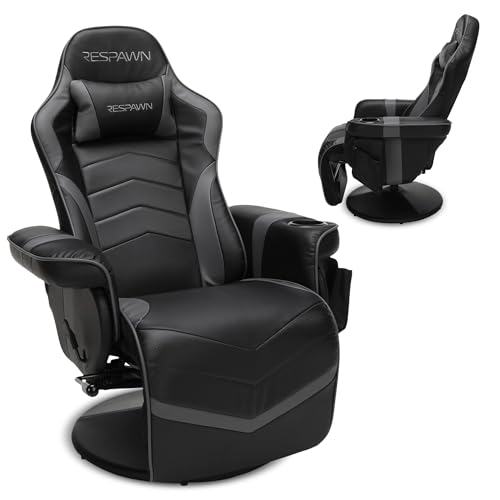


As an Amazon Associate we earn from qualifying purchases at no extra cost to you. Ratings are shown as listed on Amazon.
Quick picks by situation
| Best for | Recommended type | Typical seat dimensions | Recline range | Expected price range |
|---|---|---|---|---|
| Small bedroom or apartment | Compact rocker recliner | 19–21 in wide × 20–22 in deep | 90–135 degrees | $120–$220 |
| Average adult and frequent gaming | Racing-style pedestal recliner | 20–23 in wide × 21–24 in deep | 90–155 degrees | $180–$350 |
| Tall or broad users | Wide wall-hugger recliner | 22–26 in wide × 22–25 in deep | 95–160 degrees | $250–$500 |
| Premium comfort and shared use | Modular power recliner | 22–27 in wide × 22–26 in deep | 95–165 degrees | $450–$900+ |
These are useful buying ranges rather than universal specifications. Manufacturers measure seat width, seat depth, and maximum recline differently, so confirm the assembled dimensions and weight capacity before ordering.
1. Best for small spaces: the compact rocker recliner
A compact rocker is the practical choice when your gaming area shares a bedroom, office, or living room. Its curved base allows gentle rocking and usually takes less visual and mechanical space than a motorized recliner. Many models are around 30–34 inches wide and need approximately 12–16 inches of clearance from the wall, although the back may still move closer during reclining.
Look for a seat depth of 20–22 inches. A deeper seat can leave shorter users leaning backward with unsupported knees, while a shallow seat may feel cramped for taller players. Fixed lumbar padding is common in this category, but it is often just a broad cushion rather than a height-adjustable support.
The trade-off is durability and posture flexibility. Entry-level bonded leather or polyurethane upholstery may begin peeling at the arms and seat edge after heavy use, particularly in warm rooms. Fabric generally hides wear better and feels less sticky during long sessions, but it can absorb spills. A compact rocker is best when you game a few evenings per week and need easy assembly at a modest price.
2. Best all-rounder: the racing-style pedestal recliner
A racing-style pedestal recliner is the strongest middle-ground choice for most adults. It typically combines a bucket-shaped back, padded arms, a footrest, and a swivel base. The shape gives more lateral support than a living-room recliner, while the pedestal keeps the chair at a useful height for a controller, side table, or low gaming desk.
Choose a seat width of at least 20 inches and a usable seat depth of 21–23 inches. The word “usable” matters: thick side bolsters can make a chair’s advertised width look larger than the space available to your hips. Sit with your back against the cushion and leave roughly two to three fingers of space behind your knees. Too much empty space encourages slouching; too little can press into the legs.
Most models recline to approximately 150–155 degrees. That is enough for relaxed controller gaming and watching video, but it is not fully flat. Check whether the footrest locks securely. A footrest that flexes under load can develop looseness sooner than the seat mechanism.
What to check before choosing one
- Weight capacity: Treat the published limit as a maximum, not a target. A chair rated for 250 pounds is a better long-term choice for a 210-pound user than one rated for 220 pounds.
- Base construction: A steel pedestal is generally preferable to a thin stamped base for frequent use.
- Arm width: Wide arms improve comfort but consume desk and room space.
- Back support: Removable lumbar cushions are more useful than decorative racing stripes because they let you change support height.
- Control placement: A side lever is simpler to replace than an electronic control panel.
3. Best for tall or broad users: the wide wall-hugger
If your knees sit high or your shoulders extend beyond a narrow backrest, start with fit rather than styling. A wide recliner with a 22–26-inch seat width and at least 22 inches of seat depth is more likely to distribute pressure evenly. Taller users should also look for a backrest that reaches the upper shoulders and a footrest long enough to support the lower legs rather than ending at the calves.
A wall-hugger design is valuable in a narrow room. Instead of swinging its back far backward, it moves forward as it reclines and may require only 4–8 inches of wall clearance. However, its total footprint can still increase because the footrest projects into the room. Measure the chair in both upright and fully reclined positions.
Wide recliners usually sacrifice some bucket-style lateral support. That is not a problem for relaxed console gaming, but it may feel less secure if you frequently lean forward toward a keyboard. A separate adjustable lumbar cushion can improve fit, especially when multiple people share the chair.
4. Best premium option: modular power recliners
Power recliners offer the most precise positioning, with separate controls for the back and footrest. Some also include powered headrests, vibration, USB charging, or adjustable lumbar sections. These features can make a meaningful difference when the chair is used daily, but they add failure points and assembly complexity.
Before paying a premium, distinguish actual lumbar adjustment from a fixed pad with a massage motor. A motor may feel pleasant, but it does not automatically place support at the correct height. The useful specification is whether the lumbar section moves vertically or changes its depth.
Power furniture also needs a nearby outlet and cable management. Keep the power lead away from the footrest linkage, and avoid trapping it under the base. If the chair has a backup battery, check its stated runtime; many compact battery packs provide roughly 20–40 full recline cycles rather than several days of continuous operation.
Decision matrix: match the chair to your room and routine
| Your situation | Best match | Prioritize | Accept the trade-off |
|---|---|---|---|
| Under 35 inches of available width | Compact rocker or narrow wall-hugger | Closed dimensions, wall clearance, fabric upholstery | Less seat width and simpler lumbar support |
| Gaming 1–3 hours, two or three times weekly | Manual pedestal recliner | Seat fit, steel base, replaceable cushions | Fewer adjustment options |
| Gaming 4+ hours most days | Wide recliner or power model | Adjustable lumbar, breathable cover, warranty | Higher cost and more components to maintain |
| Sharing with people of different heights | Power recliner with independent controls | Adjustable headrest, lumbar position, seat depth | Electrical troubleshooting and outlet dependence |
| Desk-and-keyboard gaming | Firm pedestal recliner or gaming chair with footrest | Arm height, upright lock, forward reach | Less lounge-like padding |
Recline angle and lumbar support matter more than extra padding
For keyboard and mouse use, an upright position around 95–110 degrees usually keeps the screen and controls easier to reach. For controller gaming, approximately 110–130 degrees can feel more relaxed. Angles beyond 140 degrees are better for watching or resting than for precise input.
Lumbar support should fill the inward curve of your lower back without forcing your ribs forward. If it feels too high, try a thinner cushion or a lower attachment point before rejecting the chair. If the chair has no adjustment, a small separate lumbar pillow is often a cheaper solution than replacing the entire recliner.
Assembly, maintenance, and what wears first
Most manual recliners arrive in two main sections: the base and the back. Assembly commonly takes 20–45 minutes. Do not fully tighten bolts until the frame is aligned, and test the footrest several times before placing the chair against a wall. Power models can take longer because the actuator cables and control connectors must be routed safely.
The first parts to wear are usually the footrest linkage, foam at the front edge of the seat, armrest upholstery, and reclining cable or handle. Reduce premature wear with these habits:
- Close the footrest before standing rather than using it as a step.
- Keep pets from scratching synthetic leather and inspect seams every few months.
- Vacuum fabric seams and wipe synthetic upholstery with a slightly damp cloth; avoid harsh solvents.
- Do not drag the chair while occupied or lift it by the footrest.
- Retighten accessible frame bolts after the first month and then every six to twelve months.
- Leave clearance around moving parts so cables, blankets, and charging leads cannot enter the mechanism.
Bottom line
For most players, a manual racing-style pedestal recliner with a 20–23-inch seat, 21–23-inch depth, a steel base, and a recline range near 155 degrees offers the best balance. Choose a compact rocker when floor space is the limiting factor, a wide wall-hugger when body size is the limiting factor, and a power model only when adjustable lumbar and position control justify the extra cost and maintenance. Measure your body and room first; the best gaming recliner is the one that remains supportive after the novelty of its styling wears off.



Write Your Review
No reviews yet. Be the first to share your experience!